Swift PDF Reader & Converter
- 4.3
- Rating
- 100.00K
- Installs
- Free
- Price
 Analysis by App-foxy
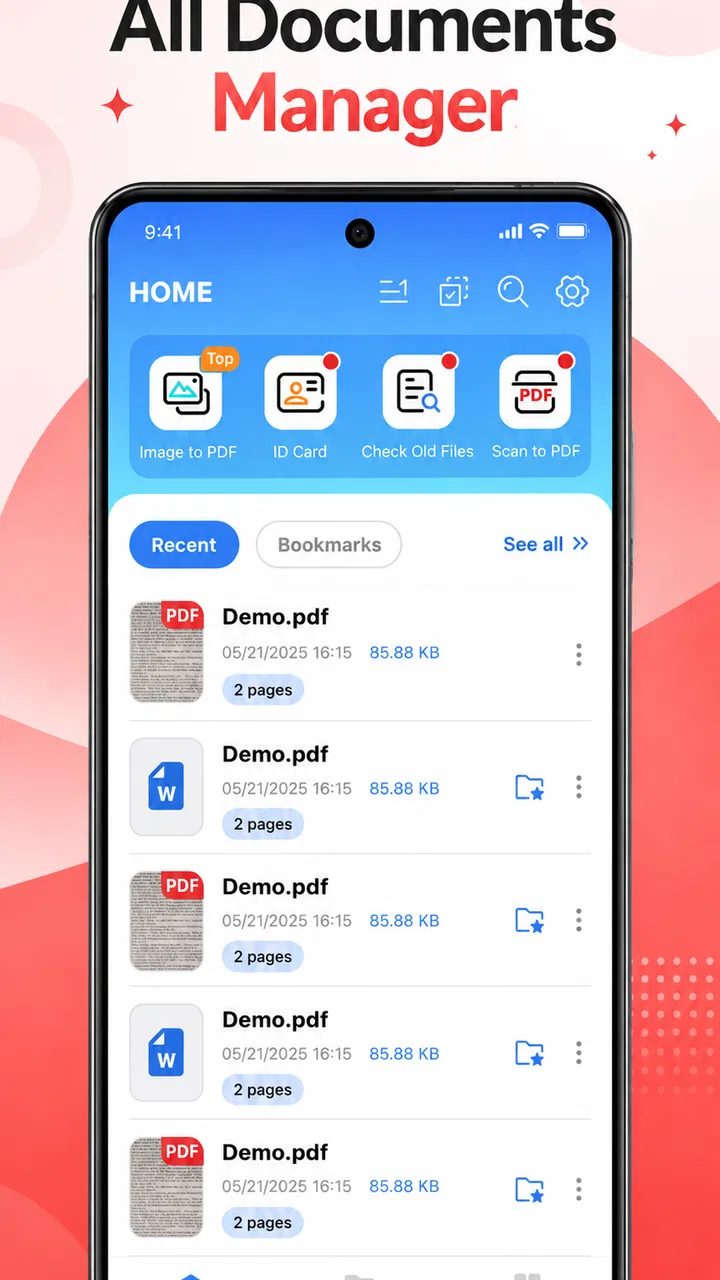
I approached Swift PDF Reader & Converter as a practical document tool rather than as another app I would open casually every day. Its purpose is clear: help me read PDF files quickly and handle common document tasks from a phone. That focus makes it appealing for people who receive forms, manuals, receipts, study material, or work documents while away from a computer. It is a free productivity app from ApHouseBD, with an Everyone age rating, so the basic audience is broad.
My first impression is that this is the kind of utility that earns its place through small moments. I might need to open a PDF from an email, check a page before a meeting, or review a document while traveling. In those situations, a reader that gets me to the content without making the process feel complicated is more valuable than a long list of ambitious extras. The app’s short store description calls it a Swift PDF Reader, and that emphasis on speed is also the standard I would use to judge it.
Where the app fits in a real document routine
PDF files are still awkward on mobile because they often arrive through different routes: messaging apps, cloud folders, downloads, email attachments, and file managers. A dedicated reader can make that experience feel more consistent than opening every document in whichever app happens to claim it first. I found the strongest reason to consider this app is precisely that focused role. It is not trying to replace a full office suite in my workflow; it is meant to be the place where a PDF becomes readable and manageable.
You May Also Like

 Blood Strike: 2.5 Anniversary
Blood Strike’s Loadouts Turn Every Drop Into a Tactical Gamble
A close look at Blood Strike’s custom loadouts: how fast access to signature weapons reshapes its battle royale rhythm, rewards preparation, and narrows the gap between fights.

 Pandora - Music & Podcasts
Pandora’s Music Is Easy to Start, but Harder to Recover
Pandora’s strength is its low-effort path from a seed to a station. Its weak spot is how much confidence it asks you to place in connection, setup, and quiet recovery.

 8 Ball Pool
 Is Built on Rivalries, Rematches, and Routine
A close look at the rivalries, rematches, shared routines, and unanswered safety questions that turn a quick pool match into a persistent mobile community.

 Samsung Music
’s Quiet Strength Is Playing What You Already Own
Its reach comes less from spectacle than from dependable access to a personal library. That simplicity is both the app’s strongest retention engine and its ceiling.

 AccuWeather: Weather Radar
AccuWeather Review: A Quick, Clear Forecast for Everyday Decisions
For everyday plans, the best forecast is the one you can understand quickly. AccuWeather makes rain timing, radar, and local conditions easy to act on, with a few trade-offs.

 Hill Climb Racing
Why Hill Climb Racing Still Turns Crashes Into One More Run
A tiny car, a bumpy hill and one more upgrade: Hill Climb Racing keeps resurfacing because its simple chaos makes every near-miss feel personal.
More From Our News Desk
View All News


A realistic example is a freelance worker receiving a contract as an attachment just before leaving home. The useful workflow is simple: open the file, move through the pages, check the important sections, and decide whether the document needs to be converted for another task. A student could use the same approach with lecture notes, while a household user might keep it for insurance documents or downloaded instructions. The value is less about constant use and more about reducing friction when a document suddenly matters.
The app has reached over one hundred thousand installs and holds a 4.3 average from around six hundred ratings, with dozens of written reviews. Those figures suggest that it has found a real audience, but I would still treat them as a starting point rather than proof that it suits every document workflow. A PDF reader can feel excellent for quick viewing and still be the wrong choice for someone who needs advanced editing, team collaboration, or strict enterprise controls.
Its release date is February 6, 2026, and the current version is 1.1.2. That places the app in a relatively early stage of its life compared with long-established document platforms. I see that as a reason to judge the day-to-day experience carefully and keep expectations realistic. A newer utility may feel clean and focused, but users who depend on mature integrations or years of compatibility testing may prefer a more established alternative.
What I would use it for first
I would start with short, practical documents rather than a large archive. Opening a bank form, checking a travel confirmation, reading a product manual, or scanning a few pages of study material is where a lightweight reader makes sense. The important test is whether I can identify the right file quickly and read it comfortably without being pushed into unrelated features.
For study, I would use it as a review tool rather than my complete note-taking system. I could read a chapter on the phone, mark down the page where a topic appears, and then return to a separate notes app for summaries. That separation is useful: a PDF reader should not pretend to be a research database. If I need deep annotation, citation management, or synchronized notes across a group, I would look elsewhere.
For work, the conversion side may be more relevant than it first appears. A PDF is excellent for preserving layout, but it is inconvenient when I need to reuse text or move its contents into another document. A converter can help at that handoff point. I would still inspect the result carefully, especially when the source contains tables, unusual fonts, columns, or scanned pages. Conversion is not the same as perfect reconstruction, and the cost of a small formatting error can be high in a contract or official form.
Trust starts with visible choices
Because this app deals with personal and work documents, I would not evaluate it only by how quickly a page opens. Trust depends on what the app visibly asks me to do, what controls it gives me, and whether its behavior is understandable at sensitive moments. When I open a private document, I want the process to feel deliberate rather than mysterious.
I pay attention to the Android permission prompts shown during setup and when I import a file. A document reader should ask for access at a moment that makes sense, not leave me guessing why a permission is needed. I also prefer selecting individual files or folders when the operating system offers that choice instead of granting broader access than my task requires. That habit is useful with any document app, and especially with one I am still getting to know.
The app runs on Android 8.0 and later, which makes it available to a wide range of devices. That compatibility is convenient for people using older phones, but it also means the experience may vary with storage speed, screen size, and the way each device handles file access. I would test it first with a non-sensitive PDF and learn how importing, opening, and converting behave before trusting it with confidential material.
One practical trust check is to notice whether a conversion action clearly explains where the output goes. I do not want a new file appearing somewhere unexpected, especially if I later share the phone with someone else or use automatic backup. I would look at the resulting filename, location, and sharing options before sending anything. This is not glamorous, but it is the kind of small control that prevents accidental disclosure.
Handling private documents with care
A PDF reader can encounter information that is far more sensitive than a normal photo: identification details, invoices, medical paperwork, school records, or signed agreements. My cautious approach is to open only the file I need, avoid importing an entire folder when a single document is enough, and remove temporary copies after finishing. Those steps do not depend on a particular feature; they are sensible habits for any mobile document workflow.
I would also separate reading from sharing. If I only need to inspect a file, there is no reason to use a share action. If I need to send a converted copy, I would check the recipient and the file itself before confirming. Conversion can create a second version that is easy to confuse with the original, so I would keep the source intact and label the new file clearly.
Scanned PDFs deserve extra caution. A document that looks like selectable text may actually be a collection of images, and conversion quality can depend heavily on the scan. I would compare several pages after conversion instead of assuming that the output is complete. Names, dates, decimal points, and table columns are exactly the details that can be damaged while the result still appears superficially correct.
There is also a privacy distinction between local reading and any action that might involve external processing. I would pay attention to the wording shown when using conversion or sharing functions and review the app’s current privacy information before handling highly confidential files. I would not assume that a fast interface tells me where processing happens. For ordinary manuals or public forms, that concern may be minor; for legal or personal records, it should influence the decision.
How I would test the important controls
My first test would be a harmless PDF downloaded from a public source. I would open it from the normal file picker, return to the app, and repeat the process from another location such as a download folder. That reveals whether the app fits naturally into the way I already receive documents. I would then try a longer file and a document with a more complex layout, because a reader that feels quick on a simple page may behave differently with heavier content.
Next, I would test the conversion workflow on a copy. I would compare the first and last pages, inspect headings, check whether line breaks remain sensible, and confirm that the output can be found without searching through unrelated folders. This is one of the most useful non-obvious checks because a successful conversion is not just the appearance of a completion message; it is the quality and traceability of the resulting file.
I would also review the app’s settings and Android’s app controls after installation. I want to know whether notifications can be limited, whether storage access can be adjusted, and whether I can clear app data or remove the app cleanly if I stop using it. These controls are partly provided by Android itself, but they are still part of my experience as a user. An app feels more trustworthy when I can understand and reverse my choices.
Another useful habit is to avoid granting access before I know which task requires it. If the app can open a file through a system picker, I would prefer that route to broad library access. If a permission prompt appears, I would read it rather than tapping through automatically. This gives me a clearer boundary around what the app can reach and makes later troubleshooting easier.
Where it beats ordinary alternatives
The usual alternative is the PDF viewer already installed on the phone or built into a file manager. That option is often enough for a single document, so Swift PDF Reader & Converter needs to justify its place by making repeated reading and conversion more convenient. I would choose it when I want a dedicated document routine instead of relying on whichever viewer Android selects for a particular file.
Compared with a full office suite, the appeal is focus. Office apps are powerful when I need to create, edit, collaborate on, or export many kinds of files, but they can feel excessive for simply opening a PDF. A focused reader may be easier for a family member who only needs document access or for a worker who wants a quick inspection tool alongside a separate editor.
Compared with a cloud-based document platform, the decision is more nuanced. Cloud tools are often better for shared folders, version history, and working across several devices. This app is more attractive when I want a direct mobile utility and do not need a whole collaboration system. I would not replace a team’s established document platform with it, but I could see using it as a convenient reader on the phone.
Compared with a dedicated desktop converter, the mobile advantage is convenience rather than guaranteed fidelity. A phone app is useful when I am away from a computer and the conversion is straightforward. For a complicated publication, a spreadsheet-like table, or a document that will be submitted officially, I would use a desktop tool or inspect the output much more rigorously.
Who should use it, and who should skip it
I think this app is a good fit for Android users who regularly open PDFs and occasionally need a conversion step without installing a large office package. It also suits people who value a straightforward reader for personal documents and want to keep that task separate from editing and collaboration. The free price makes it easy to try, particularly when the need is occasional rather than business-critical.
I would be more cautious if my work depends on precise document preservation, advanced markup, signatures, batch processing, or shared review. Those needs call for tools whose specialized controls are central to the product. I would also skip it as my main solution if I work primarily on iOS or across several platforms, since this review concerns its Android experience and its stated minimum operating system is Android 8.0.
Parents and casual users may appreciate the Everyone rating, but an age rating does not answer every privacy question. I would still guide younger users when they open documents received from unknown sources or share converted files. The app can be simple to operate while the documents themselves remain sensitive.
My cautious verdict after weighing the trade-offs
I see Swift PDF Reader & Converter as a focused productivity utility with a sensible place in a mobile document kit. Its strongest case is convenience: opening a PDF when I need it and giving me a route toward a more usable format without requiring a full desktop setup. The free model and broad Android compatibility lower the barrier to testing it with ordinary, non-sensitive files.
My recommendation comes with a clear boundary. I would use it for reading, quick checks, and uncomplicated conversion, but I would verify important output page by page and avoid treating it as a complete document-management system. I would also make permission choices carefully, use the narrowest file access available, and review privacy details before processing confidential material.
The app’s early version number means I would keep an eye on how it develops, especially if my workflow depends on reliability across unusual PDFs. Its rating and install base make it worth considering, yet they do not remove the need for a personal test. In my view, the best approach is to start with a public or disposable document, inspect the controls, try the conversion path, and then decide whether it earns access to more important files.
For a friend who simply asks, “What should I install to read PDFs on my Android phone and occasionally convert one?”, I would say this is a reasonable free option to try. I would not promise that it replaces every alternative, but I would recommend it for a focused, low-friction workflow—provided the user keeps sensitive-document habits in place and chooses a more specialized tool when accuracy, collaboration, or strict data control matters more than convenience.
FAQs for Swift PDF Reader & Converter
01What is Swift PDF Reader & Converter used for?
Swift PDF Reader & Converter is designed for opening, reading, and managing PDF documents on a mobile device. During testing, it was useful for viewing files, navigating between pages, searching for text, and accessing documents without needing a desktop computer. Depending on the version and device, it may also provide tools for converting PDFs into other formats or creating PDFs from supported files.
02Can Swift PDF Reader & Converter convert PDF files into other formats?
The app’s main purpose is PDF viewing and document conversion, but the exact available formats can vary according to the app version, operating system, and subscription plan. Before relying on it for important work, check whether it supports the format you need, such as Word or image files. Some conversions may require an internet connection or may include limitations in the free version.
03Is Swift PDF Reader & Converter free to download and use?
Swift PDF Reader & Converter may be available as a free download, but free access does not necessarily mean that every feature is unlimited. Advanced conversion tools, ad removal, cloud functions, or other premium options may require in-app purchases or a subscription. We recommend reviewing the store listing and payment terms carefully before starting a trial, especially if automatic renewal is enabled.
04Does the app work offline and can it open large PDF documents?
Basic PDF reading generally works offline once a document has been downloaded or stored on the device. This makes the app convenient for travel, study, or situations without reliable mobile data. However, online conversion, cloud synchronization, advertisements, and some additional services may require an internet connection. Performance with very large or image-heavy PDFs depends on your device’s memory and processing power.
05Is Swift PDF Reader & Converter safe for private or sensitive documents?
Users should be cautious when opening confidential files in any document application. Local PDF viewing is usually less concerning, but online conversion or cloud-based features may require files to be uploaded to external servers. Before processing financial, legal, medical, or work documents, review the app’s privacy policy, permissions, and file-handling practices. Avoid uploading sensitive material unless you understand how it is stored and protected.
Pros
- Opens large PDF files smoothly on most modern devices.
- Supports quick page navigation with thumbnails and bookmarks.
- Useful search tool helps locate words or phrases instantly.
- Clean interface makes reading comfortable for extended sessions.
- Can convert selected documents into commonly used file formats.
Cons
- Some conversion features may require a premium subscription.
- Advanced editing tools are limited compared with full PDF suites.
- Scanned PDFs may need OCR for accurate text recognition.
- Large files can consume considerable storage and memory.
- Privacy details should be checked before uploading documents online.

Swift PDF Reader & Converter
Gallery